
Subtotal ₨ 0
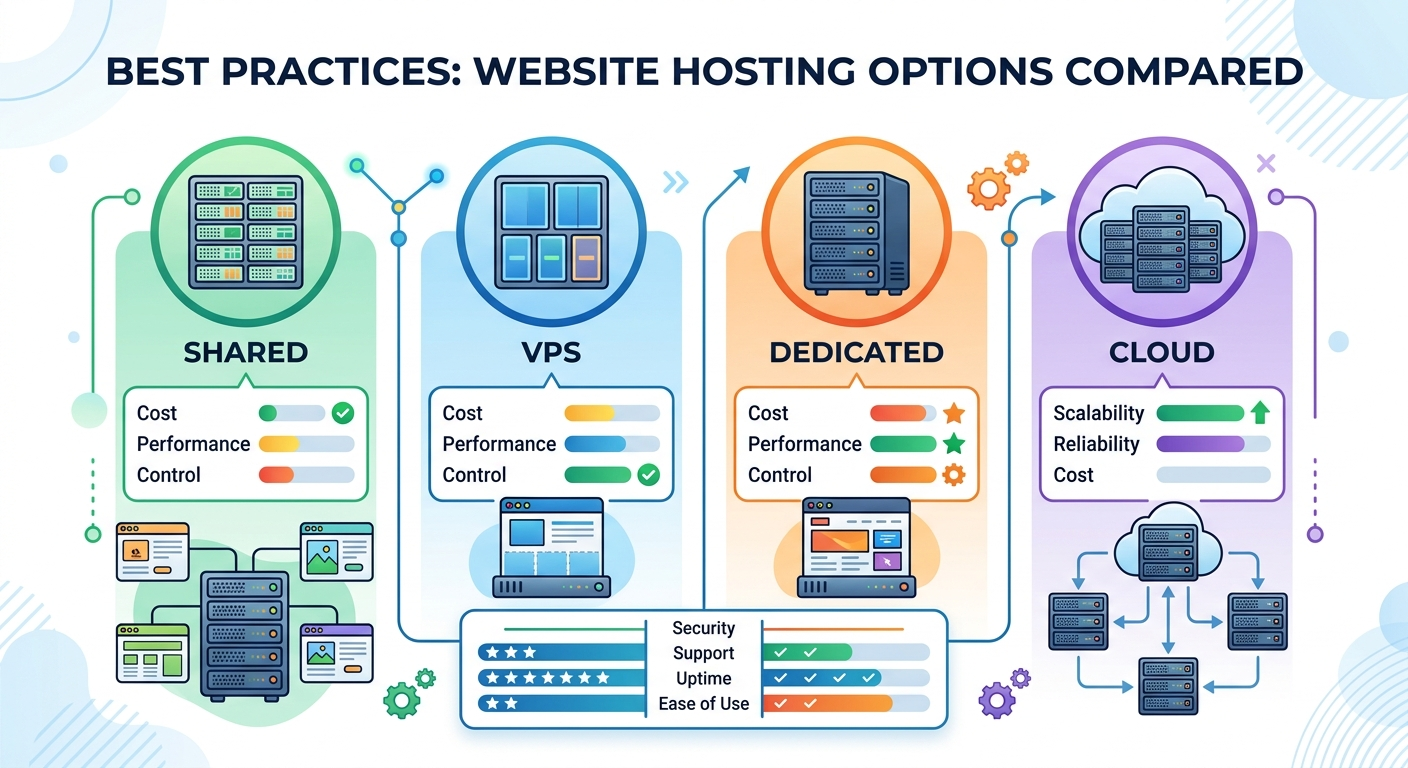
Selecting the best web hosting services is one of the most critical decisions you will make for your online presence. A reliable hosting infrastructure directly influences your site’s loading speed, security posture, overall user experience, and search engine rankings. Consequently, picking an inadequate host can lead to frequent downtime, slow page load times, and poor Google Core Web Vitals scores.
In this comprehensive guide, we examine the best web hosting services available today, analyze essential performance factors, and outline actionable best practices to help you choose the best website hosting services tailored to your goals.
Why Choosing the Best Web Hosting Services Matters for SEO
Google uses page performance and Core Web Vitals—specifically Largest Contentful Paint (LCP) and Interaction to Next Paint (INP)—as direct ranking signals. If your host relies on outdated server hardware or oversells shared resources, your site speed will suffer regardless of how well your code is optimized.
Furthermore, continuous server uptime is vital. Search engine crawlers struggle to index websites that experience intermittent downtime, which can lead to dropped keyword rankings and lost traffic. Choosing high-rated web hosts backed by strict Service Level Agreements (SLAs) ensures your site remains accessible 24/7.
5 Essential Factors to Consider When Evaluating Hosting Options
Before comparing specific hosting providers, you must understand the primary technical criteria that define the best web hosting services:
- Server Architecture & Speed: Modern hosts utilize LiteSpeed or Nginx web servers coupled with high-speed NVMe storage drives. These technologies dramatically reduce Time to First Byte (TTFB) compared to legacy Apache setups.
- Guaranteed Uptime (99.9%+): Look for providers offering an official uptime guarantee backed by infrastructure redundancy.
- Scalability: Your hosting plan should allow seamless vertical upgrades—moving from shared hosting to a Virtual Private Server (VPS) or cloud hosting as your traffic grows.
- Built-in Security Protocols: Standard security features must include free automated SSL certificates, Web Application Firewalls (WAF), daily offsite backups, and proactive DDoS protection.
- Developer & WordPress Support: Staging environments, automatic plugin/core updates, Git integration, and 24/7 expert technical support are essential for smooth maintenance.
Comparison of the Best Web Hosting Services
The following table summarizes the key features, pricing, and infrastructure highlights of top-tier providers across different categories:
| Provider | Best For | Server Type | Key Technology | Security Features | Starting Price |
| Hostinger | Best Value & Overall Speed | Shared / Cloud | LiteSpeed, NVMe, LSCache | Free SSL, WAF, Cloudflare Protected | ~$1.99 / mo |
| Bluehost | Best for Beginner WordPress Sites | Shared / Managed WP | Nginx, SSD, Built-in Caching | Free SSL, Malware Scanning | ~$1.99 / mo |
| SiteGround | Premium Performance & Customer Support | Google Cloud Infrastructure | SuperCacher, Ultrafast PHP | Custom WAF, Daily Backups | ~$2.99 / mo |
| Cloudways | Scalable Managed Cloud Hosting | Cloud (DO, AWS, Vultr) | Redis, Memcached, Dedicated RAM | OS-level Firewall, Automated Backups | ~$14.00 / mo |
| WP Engine | Enterprise Managed WordPress | Dedicated Cloud | Proprietary EverCache, CDN | Global Edge Security, Automated Patches | ~$20.00 / mo |
Detailed Analysis of Top Web Hosting Providers
1. Hostinger: Best Web Hosting services for Affordability and Speed
Hostinger consistently delivers outstanding speed and feature richness at a budget-friendly price point. Powered by LiteSpeed web server technology and LSCache integration, Hostinger delivers exceptionally fast response times for WordPress websites.
- Strengths: Intuitive custom control panel (hPanel), custom AI website builder tools, auto-installer, and NVMe storage options on higher tiers.
- Best Suited For: Personal blogs, small businesses, and e-commerce stores looking for high performance without high monthly overhead.
2. Bluehost: Officially Recommended WordPress Hosting
Bluehost remains a dominant choice in the content management ecosystem due to its seamless WordPress integration and beginner-friendly onboarding process.
- Strengths: Officially recommended by WordPress.org, includes a free domain name for the first year, automatic WordPress installation, and 24/7 support.
- Best Suited For: Beginners launching their first website or business owners who prioritize easy setup over custom server configuration.
3. SiteGround: High-Performance Infrastructure & Support
SiteGround runs its platform on Google Cloud infrastructure, giving users enterprise-grade reliability and low latency. Its proprietary SuperCacher technology significantly decreases page load times for dynamic websites.
- Strengths: Excellent uptime metrics, unmatchable customer service response times, automated staging sites, and free daily backups.
- Best Suited For: Established websites, growing blogs, and business sites requiring maximum stability.
4. Cloudways: Ultimate Cloud Scalability
For developers and fast-growing businesses, Cloudways offers managed cloud hosting that bridges the gap between unmanaged cloud servers (like DigitalOcean, AWS, and Google Cloud) and managed platforms.
- Strengths: Dedicated server resources, pay-as-you-go pricing, flexible vertical scaling, advanced caching stacks (Varnish, Redis, Memcached), and unlimited site installations.
- Best Suited For: Agencies, high-traffic publications, and WooCommerce stores needing customizable cloud resources.
5. WP Engine: Premier Managed WordPress Hosting
WP Engine is a enterprise-focused provider that delivers managed hosting built strictly for WordPress. It offloads server management, security monitoring, and performance tuning from website owners.
- Strengths: Automatic core and plugin updates, daily automated backups, built-in staging and development environments, and proprietary caching frameworks.
- Best Suited For: Large organizations, high-traffic enterprise portals, and mission-critical web applications.
Best Practices for Deploying and Configuring Your Host
Selecting the right provider is only half the battle. To maximize page load speed and security, implement these best practices when setting up your best web hosting services environment:
                  ┌─────────────────────────────────────────┐
                  │  1. Select Optimal Data Center Region  │
                  └────────────────────┬────────────────────┘
                                       │
                                       ▼
                  ┌─────────────────────────────────────────┐
                  │   2. Configure Server-Level Caching     │
                  └────────────────────┬────────────────────┘
                                       │
                                       ▼
                  ┌─────────────────────────────────────────┐
                  │   3. Enable Free SSL & HTTP/3 Protocol  │
                  └────────────────────┬────────────────────┘
                                       │
                                       ▼
                  ┌─────────────────────────────────────────┐
                  │   4. Integrate Cloudflare Global CDN    │
                  └────────────────────┬────────────────────┘
                                       │
                                       ▼
                  ┌─────────────────────────────────────────┐
                  │   5. Schedule Automated Daily Backups   │
                  └─────────────────────────────────────────┘
- Choose the Right Server Location: Always pick a data center closest to your primary target audience to reduce latency.
- Enable Object and Page Caching: Activate server-side caching solutions such as LiteSpeed Cache, Redis, or Memcached to minimize database query processing.
- Connect a Content Delivery Network (CDN): Integrate a global CDN like Cloudflare to serve static media assets from edge locations worldwide.
- Enforce SSL and HTTP/3: Ensure your host supports free Let’s Encrypt SSL certificates and HTTP/3 network protocols for encrypted, parallel data transmission.
- Maintain Automated Daily Offsite Backups: Never rely solely on local web server backups. Store copies on isolated cloud storage (such as AWS S3 or Google Cloud Storage) to protect against unexpected server corruption.
Frequently Asked Questions (FAQ)
What is the difference between shared web hosting and managed cloud hosting?
Shared hosting houses multiple websites on a single physical server, sharing CPU, RAM, and bandwidth resources. Managed cloud hosting isolates your site’s resources across virtualized server clusters, offering higher stability, faster speeds, and effortless scalability.
How does web hosting impact Google SEO rankings?
Web hosting directly affects key SEO performance factors, including Time to First Byte (TTFB), page loading speed, uptime, and mobile responsiveness. Sites hosted on fast, reliable servers achieve better Core Web Vitals scores, which positively influences rankings.
Which option is the best web hosting services for WordPress?
For beginners and small businesses, Hostinger and Bluehost offer the best combination of affordability and simplicity. For high-traffic business sites requiring managed performance, SiteGround and WP Engine provide superior server technology and specialized WordPress support.
Final Thoughts
Finding the best web hosting services requires balancing your budget, technical proficiency, and site performance goals. For most new or growing websites, starting with an affordable host like Hostinger or Bluehost provides a solid foundation. As your monthly traffic scales, transitioning to managed cloud infrastructure like Cloudways or WP Engine guarantees your website remains fast, secure, and ready for growth. contact us