
Subtotal ₨ 0

Focus Keyword: how to design a 404 page
Secondary Keywords: 404 page design, what is a 404 page
Have you ever clicked a link and landed on a 404 error page? A poorly designed error page can frustrate visitors and make them leave your website. However, a useful and attractive 404 page can guide visitors toward other parts of your website.
If you are wondering how to design a 404 page, the answer is simple: keep it clear, helpful, fast, and consistent with your brand. In this guide, you will learn what is a 404 page, why it matters, and the best practices for creating an effective 404 page design.
What Is a 404 Page?
Before learning how to design a 404 page, it is important to understand what it means.
A 404 page is displayed when a visitor tries to open a URL that does not exist on your website. This can happen because a page was deleted, a URL was changed, a visitor entered the wrong address, or a link is broken.
Common causes of a 404 error include:
- Deleted webpages
- Changed URLs
- Incorrectly typed URLs
- Broken internal links
- Outdated external links
- Moved website content
A basic 404 page may simply display a message such as “Page Not Found.” A better 404 page design, however, gives visitors helpful options for finding the information they need.
Why Is a Good 404 Page Important?
A 404 page is more than an error message. It is another opportunity to improve your website’s user experience.
A well-designed page can:
- Reduce visitor frustration
- Keep users on your website
- Improve website navigation
- Help visitors discover useful content
- Maintain your brand identity
- Encourage visitors to explore other pages
When considering how to design a 404 page, always think about what the visitor should do after seeing the error.
How to Design a 404 Page Effectively
Learning how to design a 404 page starts with understanding what visitors need when they cannot find the page they expected.
Here are the most important best practices to follow.
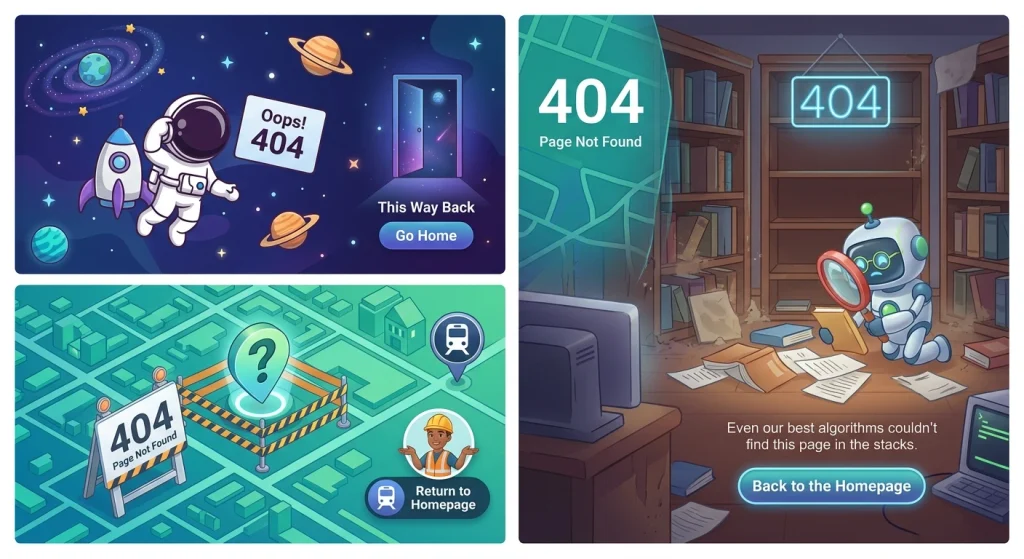
1. Keep Your 404 Page Simple
The first rule of good 404 page design is simplicity.
Visitors should immediately understand that the requested page could not be found. Avoid unnecessary text, complicated layouts, or excessive animations.
For example:
Oops! We couldn’t find that page.
The page may have been moved, deleted, or the URL may be incorrect.
This simple message explains the problem without confusing the visitor.
2. Add a Clear Homepage Button
One of the easiest ways to improve your 404 page is to provide a clear path back to your homepage.
Use a noticeable button such as:
Go to Homepage
This gives visitors an immediate way to continue browsing your website instead of leaving.
When deciding how to design a 404 page, always include at least one obvious navigation option.
3. Include Website Navigation
Your 404 page should not become a dead end.
Include links to important sections of your website, such as:
- Home
- About
- Services
- Blog
- Contact
- Products
This allows visitors to continue exploring your website even when the original page is unavailable.
4. Add a Search Bar
A search bar can make your 404 page design significantly more useful.
If visitors cannot find the page they wanted, they can search for a related topic, product, service, or article.
This is particularly helpful for large websites with many pages and blog posts.
5. Match Your Website Branding
Your 404 page should look like it belongs to your website.
Use the same:
- Logo
- Brand colors
- Typography
- Buttons
- Design style
- Visual elements
Consistent branding creates a professional experience and helps visitors understand that they are still on the correct website.
A strong 404 page design should feel like an extension of your website rather than a separate error screen.
6. Recommend Useful Pages
Another important part of learning how to design a 404 page is understanding how to redirect visitors toward useful content.
Consider adding links to:
- Popular blog posts
- Main services
- Recent articles
- Best-selling products
- Important landing pages
- Contact information
These recommendations give visitors a reason to stay on your website.
7. Use a Clear Call to Action
A good 404 page should encourage visitors to take another action.
Depending on your website, your CTA could be:
Explore Our Services
Read Our Latest Blogs
Return to Homepage
Contact Us
Make the CTA clear and easy to find.
8. Make the Page Mobile-Friendly
Your 404 page must work properly on smartphones, tablets, and desktop computers.
Make sure:
- Text is easy to read.
- Buttons are easy to tap.
- Navigation works correctly.
- Images are properly sized.
- The page loads quickly.
- Content fits smaller screens.
A responsive 404 page design helps provide a consistent experience across different devices.

9. Add Personality to Your 404 Page
A 404 page does not have to look boring.
You can use a creative illustration, friendly message, or subtle humor to make the page more memorable.
For example:
404 Looks like this page took a wrong turn!
However, creativity should never make the page difficult to use. The main purpose should always be helping visitors find their way back to useful content.
10. Keep Your 404 Page Fast
Website speed matters even on an error page.
Avoid using unnecessarily large images, videos, or heavy animations. Compress images and keep the page lightweight.
A fast 404 page provides a better experience and helps visitors quickly find another page.
Common 404 Page Design Mistakes
Knowing what to avoid is just as important as knowing how to design a 404 page.
Here are some common mistakes to avoid.
Only Displaying “404”
A page that only says “404” does not help visitors understand what happened or where they should go next.
Removing Navigation
Do not remove your website’s navigation completely. Visitors should have an easy way to explore other sections.
No Call to Action
Without a CTA, visitors may simply close the page. Give them a clear next step.
Using Too Many Graphics
Large animations and unnecessary visual effects can distract visitors and slow down your page.
Ignoring Mobile Users
Always test your 404 page on smartphones and tablets. A design that works on desktop may not work well on smaller screens.
Sending Every 404 to the Homepage
Automatically redirecting every missing URL to the homepage is not always the best solution. When a relevant replacement page exists, redirecting the old URL to that specific page can provide a better experience.
How to Create a Better 404 Page for SEO
A good 404 page can support a better overall website experience, but you should not try to manipulate search engines by filling the page with keywords.
When creating your 404 page design, focus on users first.
Follow these practices:
- Use a clear 404 status code.
- Provide useful navigation.
- Fix important broken internal links.
- Redirect permanently moved pages when appropriate.
- Avoid unnecessary keyword stuffing.
- Keep the page fast and mobile-friendly.
- Regularly check for broken links.
A 404 error itself is not necessarily an SEO problem. Websites naturally have some URLs that no longer exist. The important thing is to manage broken links and deleted content properly.
Example of a Good 404 Page
A simple 404 page could look like this:
404
Oops! Page Not Found
The page you’re looking for may have been moved, deleted, or the URL may be incorrect.
[Go to Homepage]
[Search Website]
Popular Pages
- Web Development
- Digital Marketing
- Our Services
- Latest Blog Posts
- Contact Us
This type of layout gives visitors several options instead of leaving them at a dead end.
404 Page Design Checklist
Use this checklist when creating or improving your 404 page:
- Clearly explain that the page was not found
- Add a homepage button
- Include useful navigation
- Add a search bar
- Maintain your website branding
- Recommend relevant pages
- Include a clear CTA
- Make the page mobile-friendly
- Optimize images and loading speed
- Check your website for broken links
Final Thoughts
A 404 error does not have to end a visitor’s journey. With the right approach, your error page can help visitors discover other useful parts of your website.
If you are learning how to design a 404 page, focus on three main goals: make the error clear, provide helpful navigation, and give visitors an easy next step.
A professional 404 page design can improve user experience, strengthen your branding, and encourage visitors to continue exploring your website.